Meet the Ringies: nmbr AI gives every call its own dancing character
By the nmbr AI teamPublished Facts checked 4 min read
A phone call has looked and sounded the same for decades: a name, a photo, a ringtone. nmbr AI adds a little theatre. When someone calls you, a Ringie shows up on the ringing screen: a funny animated character with its own music, dancing in place of your ringtone. Next call, it’s someone else.


A hundred characters, twenty moods
Every Ringie belongs to one of five groups, and every group has its own kind of music:
- Snack Bar, funky: a happy cupcake, a sneaky cookie, a pizza slice begging not to be eaten.
- Zoo Crew, funny: a fainting goat, a sleepy sloth, a very angry goose.
- Street Stuff, hip-hop: a sneaker, a boombox, a bus stop let down by the bus.
- Space, deep house: a rocket, a smug Saturn, a sad Pluto.
- Desert Oasis, Arabian: a happy camel, Sinbad, a genie lamp, a sandstorm in a mood.
Each group has one Ringie for each of twenty moods: happy, excited, panicking, anxious, scared, sad, disappointed, angry, lovestruck, sleepy, pleading, dramatic, sneaky, suspicious, smug, shocked, heroic, awkward, bored and party. The mood sets the tune: the scared ones are properly scary, the party ones are a party, and the dramatic ones are very, very dramatic.
A new one every call
Ringies are picked at random from the groups and moods you keep, and never the same one twice in a row. That turns out to be a game: call a friend, see who shows up, hang up, call again. Fair warning.
Your caller is never hidden: their photo, name and nmbr sit right under the Ringie, with the answer and decline buttons where they always are.
Where they show up
- On the web: whenever a call rings in the web app, with the Ringie’s music in place of the ringtone.
- On Android: while the nmbr app is open in front of you, with the music, at your ringer volume. Silent mode and Do Not Disturb keep it quiet, as they do your ringtone.
- On iPhone: while the app is open, the Ringie dances without its music, and your iPhone plays its own ringtone as usual.
- App closed or phone locked: your phone rings the way it always has, with its own call screen and ringtone.
Stickers that play music
Every group is also a sticker pack in the chat sticker picker, named “Ringies: Snack Bar”, “Ringies: Space” and so on. A Ringie sticker plays its music once when it lands in an open chat, sent or received. Tap it to hear it again. It stays quiet while a call is ringing or on, and the stickers work whatever your Ringies settings say.

Pick your cast, or switch them off
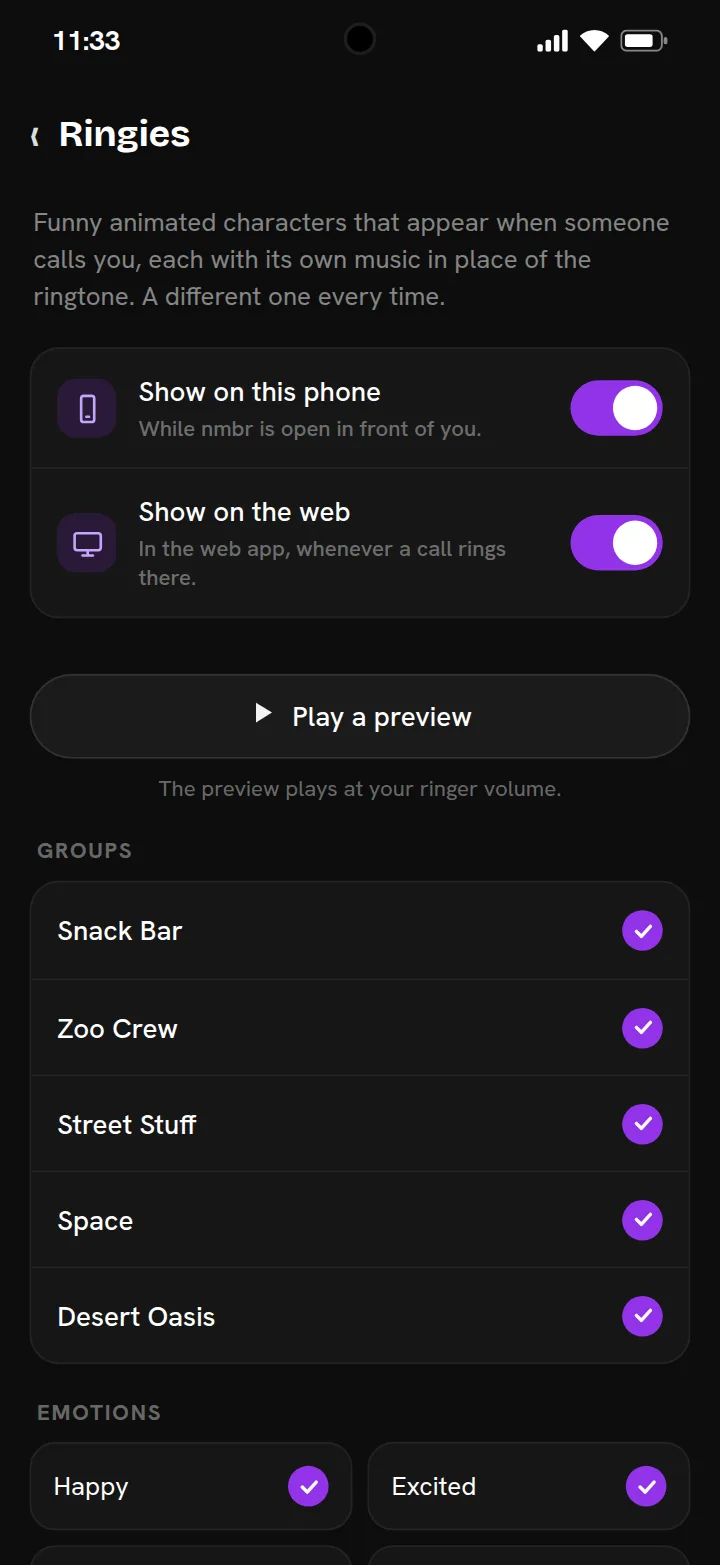
Go to Settings → General → Ringies. There you can:
- switch them on or off for this phone and for the web, separately;
- untick any group or mood you’d rather not meet (with nothing ticked, Ringies are off);
- tap Play a preview to meet one right there.
Your choices are saved on your account, so they follow you from phone to browser. The first time a Ringie shows up, a line under it tells you where to turn them off. Turn both switches off and your calls ring exactly as they did before.
Try it
Ringies come with nmbr AI, the messaging app with a nine-digit nmbr that isn’t tied to a SIM, where only people you accept can call you. Get the app, or open nmbr in your browser, and ask a friend to call you.
Questions people ask
What are Ringies?
Funny animated characters on nmbr AI’s ringing screen. When someone calls you, a random one shows up with its own music in place of the ringtone. There are a hundred, in five groups, one for each of twenty moods.
Do Ringies work on iPhone?
Yes, without the music. On iPhone the Ringie dances on the ringing screen while the app is open, and the iPhone plays its own ringtone as usual. On Android and on the web, the Ringie’s music replaces the ringtone.
Do Ringies show when my phone is locked?
No. On a phone they show only while the nmbr app is open in front of you. With the app closed or the phone locked, the call rings the way it always has. On the web they show whenever a call rings.
How do I turn Ringies off?
Go to Settings → General → Ringies and switch off Show on this phone and Show on the web, or untick the groups and moods you don’t want. With nothing ticked, Ringies are off.
Are Ringies stickers too?
Yes. Every group is a sticker pack in the chat sticker picker. A Ringie sticker plays its music once when it arrives in an open chat, and again when you tap it. It stays quiet during a call.